
When the Real Problem is Architecture
The Brief That Wasn't the Real Brief
On paper, this was a performance project. A global dairy co-operative one of the world's largest wanted its Salesforce platform to load faster and feel less painful to use. Operational teams across multiple regions were logging delays, hitting validation errors daily, and describing the interface as something they worked around rather than with.
The brief said: redesign the screens. Make it modern. Align it with the cloud-first roadmap.
But when I started looking at the system, it became clear that redesigning screens was the wrong solution to the actual problem. The Visualforce pages were not just old-looking they were architecturally broken. Business logic had been embedded directly into the UI layer over years of accumulated patches. Every field, every form, every page was tightly coupled to backend rules that had never been documented. Changing anything risked breaking something else. No wonder the team was afraid to touch it.
Understanding the Real Problem
Instead of jumping into UI redesign, I started with a structured UX audit. I evaluated Task flows and click depth, Role-based access differences, Business rule dependencies, Data flow complexity & Cognitive load in large forms
What I discovered was that the issue wasn’t just performance it was architectural. The UI and backend logic were tightly coupled, which made every change expensive and risky. This meant our solution needed to be both UX-driven and architecture-aware.
Proving Value Before Scaling
Since this was an enterprise environment, stakeholders needed proof before committing to full migration. Selected one high-impact page and rebuilt it using Lightning Web Components. In this redesigned version,
Simplified information hierarchy
Grouped related fields logically
Introduced progressive disclosure
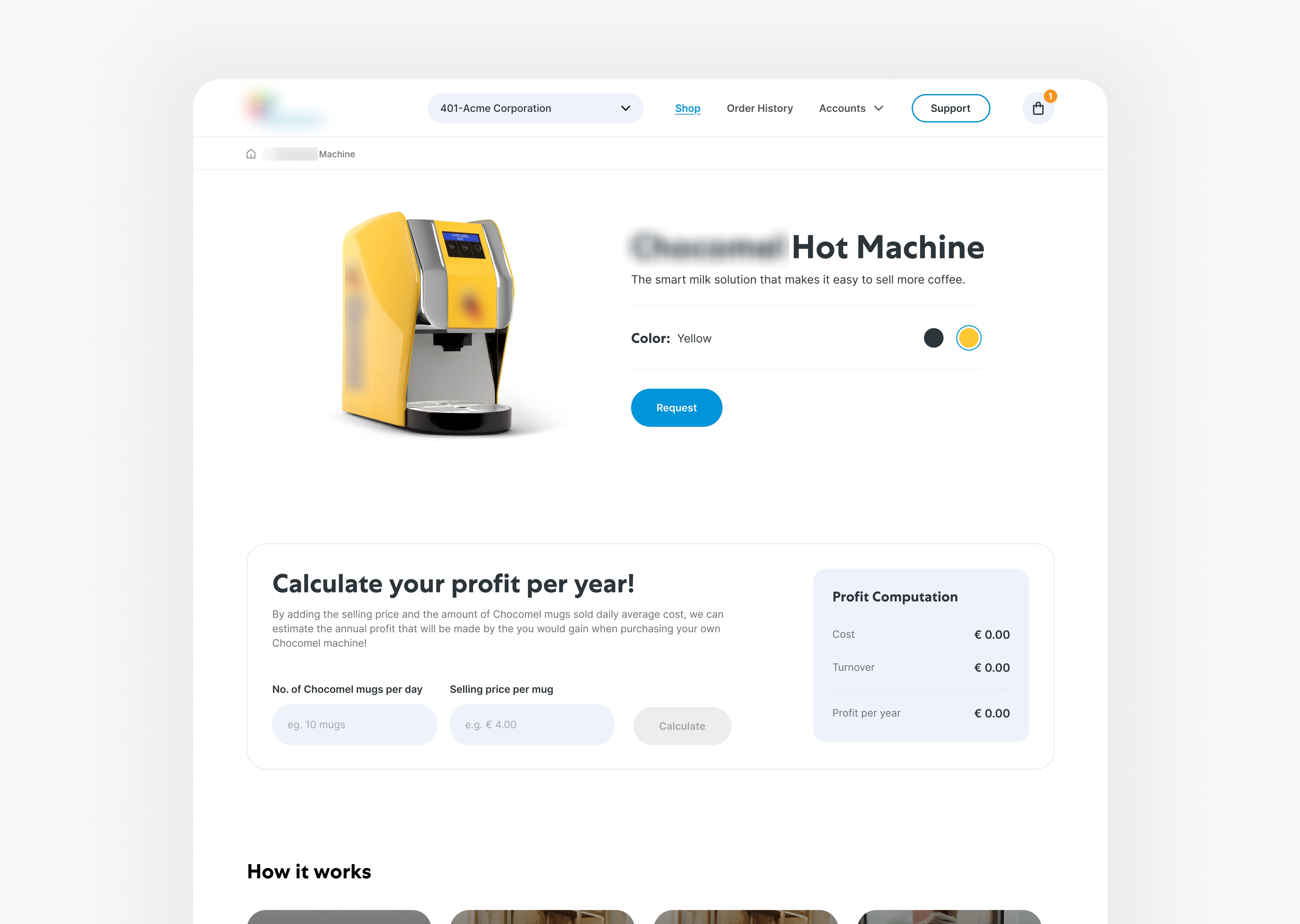
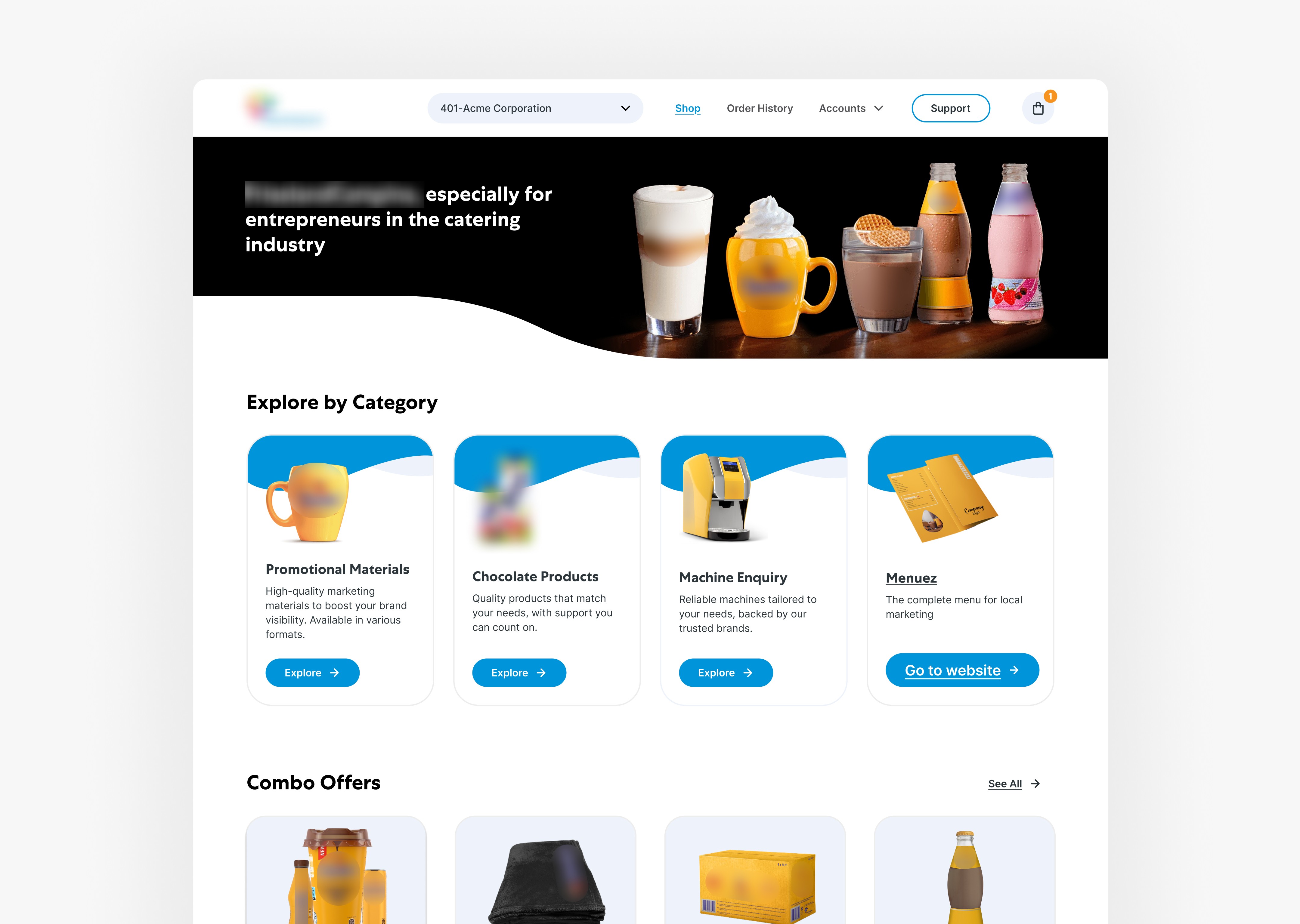
The difference was immediately visible faster load time, cleaner layout, fewer errors. That PoC helped us secure approval to modernize 19 high-usage Visualforce pages.
Experience Redesign
Simplified Information Architecture
Logical grouping of fields
Progressive disclosure for advanced inputs
Reduced visual clutter
Role-Based UX
Personalized views
Controlled access logic
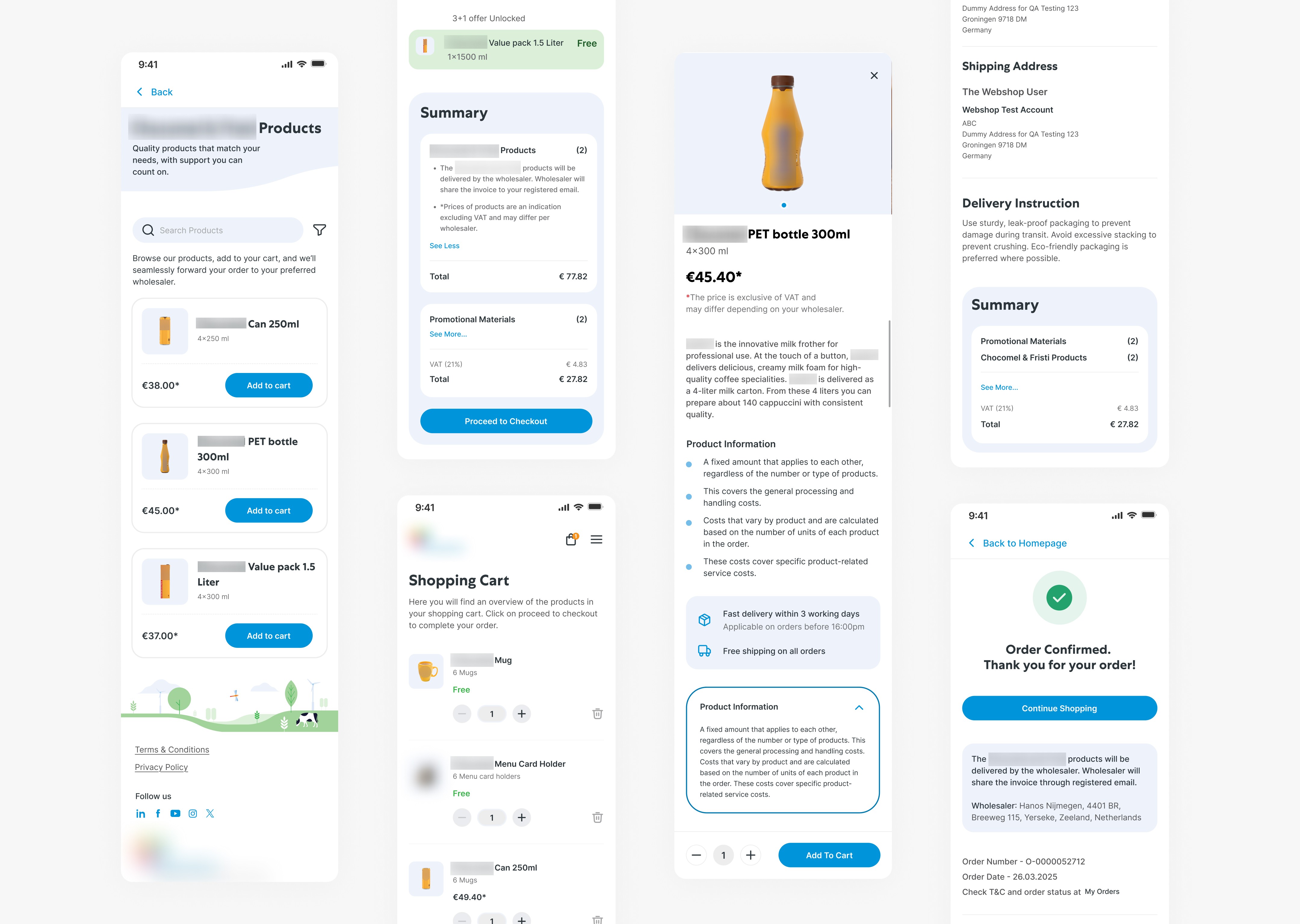
Component-Based Design System
Reusable UI components
Scalable layout structure
Improved maintainability
Scaling the Modernization
Once approved, the focus shifted to scalability and governance. Converted 19 legacy pages into modular Lightning components. Separated UI from business logic, Implemented reusable component patterns, Optimized validation rules directly within Salesforce & Conducted role-based testing to ensure no disruption.
The key here was balancing UX improvements with technical feasibility and business continuity.
The Results
25% faster operational workflows
Significant reduction in technical debt
Improved maintainability with component-based architecture
Reduced user errors due to real-time validation
Cleaner role-based access experience
More importantly, the system became future-ready and aligned with their cloud transformation roadmap.
Metric | Before | After |
|---|---|---|
Page Load | High | Reduced by 25% |
UX Consistency | Fragmented | Unified |
Validation | Backend-only | Real-time + contextual |
Scalability | Limited | Component-based |
Maintainability | Complex | Modular |
When the Real Problem is Architecture
The Brief That Wasn't the Real Brief
On paper, this was a performance project. A global dairy co-operative one of the world's largest wanted its Salesforce platform to load faster and feel less painful to use. Operational teams across multiple regions were logging delays, hitting validation errors daily, and describing the interface as something they worked around rather than with.
The brief said: redesign the screens. Make it modern. Align it with the cloud-first roadmap.
But when I started looking at the system, it became clear that redesigning screens was the wrong solution to the actual problem. The Visualforce pages were not just old-looking they were architecturally broken. Business logic had been embedded directly into the UI layer over years of accumulated patches. Every field, every form, every page was tightly coupled to backend rules that had never been documented. Changing anything risked breaking something else. No wonder the team was afraid to touch it.
Understanding the Real Problem
Instead of jumping into UI redesign, I started with a structured UX audit. I evaluated Task flows and click depth, Role-based access differences, Business rule dependencies, Data flow complexity & Cognitive load in large forms
What I discovered was that the issue wasn’t just performance it was architectural. The UI and backend logic were tightly coupled, which made every change expensive and risky. This meant our solution needed to be both UX-driven and architecture-aware.
Proving Value Before Scaling
Since this was an enterprise environment, stakeholders needed proof before committing to full migration. Selected one high-impact page and rebuilt it using Lightning Web Components. In this redesigned version,
Simplified information hierarchy
Grouped related fields logically
Introduced progressive disclosure
The difference was immediately visible faster load time, cleaner layout, fewer errors. That PoC helped us secure approval to modernize 19 high-usage Visualforce pages.
Experience Redesign
Simplified Information Architecture
Logical grouping of fields
Progressive disclosure for advanced inputs
Reduced visual clutter
Role-Based UX
Personalized views
Controlled access logic
Component-Based Design System
Reusable UI components
Scalable layout structure
Improved maintainability
Scaling the Modernization
Once approved, the focus shifted to scalability and governance. Converted 19 legacy pages into modular Lightning components. Separated UI from business logic, Implemented reusable component patterns, Optimized validation rules directly within Salesforce & Conducted role-based testing to ensure no disruption.
The key here was balancing UX improvements with technical feasibility and business continuity.
The Results
25% faster operational workflows
Significant reduction in technical debt
Improved maintainability with component-based architecture
Reduced user errors due to real-time validation
Cleaner role-based access experience
More importantly, the system became future-ready and aligned with their cloud transformation roadmap.
Metric | Before | After |
|---|---|---|
Page Load | High | Reduced by 25% |
UX Consistency | Fragmented | Unified |
Validation | Backend-only | Real-time + contextual |
Scalability | Limited | Component-based |
Maintainability | Complex | Modular |
When the Real Problem is Architecture
The Brief That Wasn't the Real Brief
On paper, this was a performance project. A global dairy co-operative one of the world's largest wanted its Salesforce platform to load faster and feel less painful to use. Operational teams across multiple regions were logging delays, hitting validation errors daily, and describing the interface as something they worked around rather than with.
The brief said: redesign the screens. Make it modern. Align it with the cloud-first roadmap.
But when I started looking at the system, it became clear that redesigning screens was the wrong solution to the actual problem. The Visualforce pages were not just old-looking they were architecturally broken. Business logic had been embedded directly into the UI layer over years of accumulated patches. Every field, every form, every page was tightly coupled to backend rules that had never been documented. Changing anything risked breaking something else. No wonder the team was afraid to touch it.
Understanding the Real Problem
Instead of jumping into UI redesign, I started with a structured UX audit. I evaluated Task flows and click depth, Role-based access differences, Business rule dependencies, Data flow complexity & Cognitive load in large forms
What I discovered was that the issue wasn’t just performance it was architectural. The UI and backend logic were tightly coupled, which made every change expensive and risky. This meant our solution needed to be both UX-driven and architecture-aware.
Proving Value Before Scaling
Since this was an enterprise environment, stakeholders needed proof before committing to full migration. Selected one high-impact page and rebuilt it using Lightning Web Components. In this redesigned version,
Simplified information hierarchy
Grouped related fields logically
Introduced progressive disclosure
The difference was immediately visible faster load time, cleaner layout, fewer errors. That PoC helped us secure approval to modernize 19 high-usage Visualforce pages.
Experience Redesign
Simplified Information Architecture
Logical grouping of fields
Progressive disclosure for advanced inputs
Reduced visual clutter
Role-Based UX
Personalized views
Controlled access logic
Component-Based Design System
Reusable UI components
Scalable layout structure
Improved maintainability
Scaling the Modernization
Once approved, the focus shifted to scalability and governance. Converted 19 legacy pages into modular Lightning components. Separated UI from business logic, Implemented reusable component patterns, Optimized validation rules directly within Salesforce & Conducted role-based testing to ensure no disruption.
The key here was balancing UX improvements with technical feasibility and business continuity.
The Results
25% faster operational workflows
Significant reduction in technical debt
Improved maintainability with component-based architecture
Reduced user errors due to real-time validation
Cleaner role-based access experience
More importantly, the system became future-ready and aligned with their cloud transformation roadmap.
Metric | Before | After |
|---|---|---|
Page Load | High | Reduced by 25% |
UX Consistency | Fragmented | Unified |
Validation | Backend-only | Real-time + contextual |
Scalability | Limited | Component-based |
Maintainability | Complex | Modular |